0.big_picture
The big picture
- img back up from here
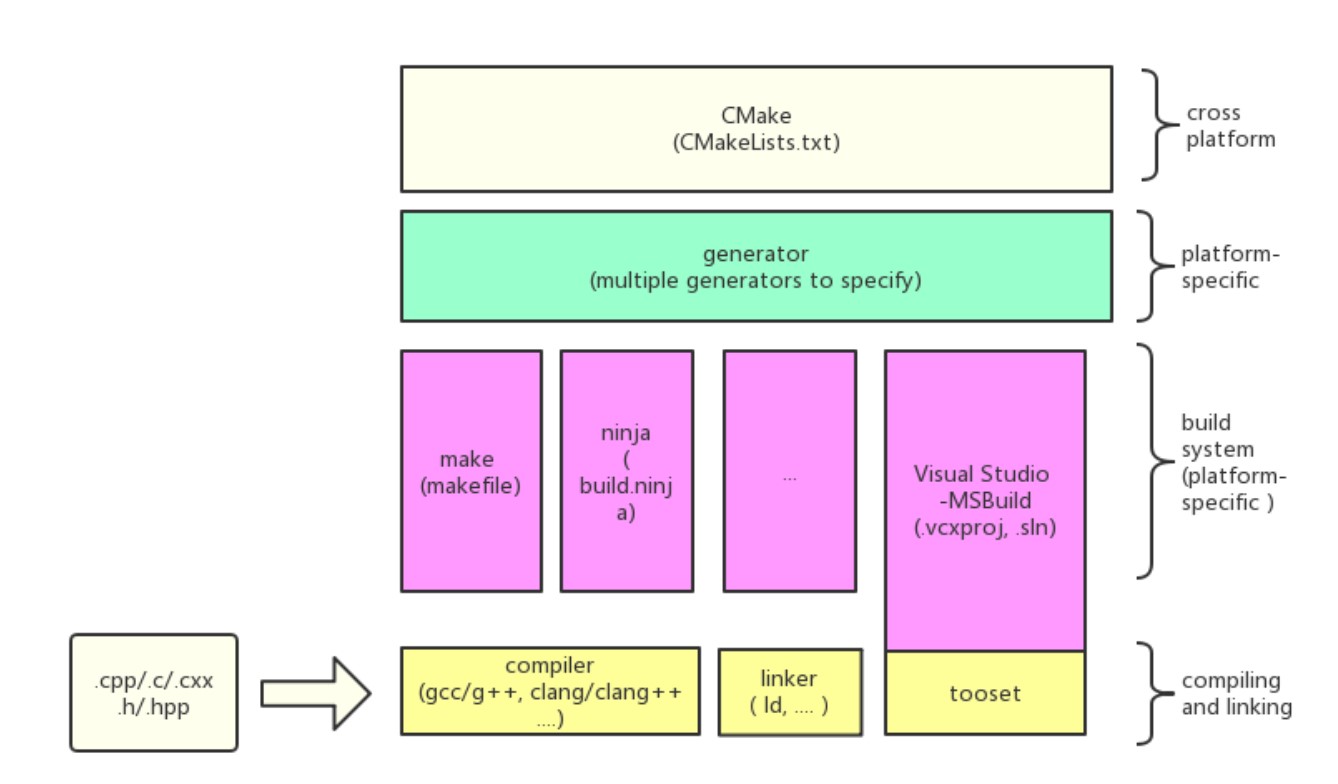
This diagram maps out the workflow and components involved in building a C++ project with CMake, from specifying the source files to the compilation and linking of the project using a chosen build system.
-
Source Files (.cpp/.c/.cxx, .h/.hpp)
- Description: These files contain the actual C++ source code and headers written by developers.
- Role: They are the input files that will be compiled and linked to create the final executable or library.
-
CMake Configuration (CMakeLists.txt)
- Description: This is a configuration script where you define build instructions, dependencies, and the required compiler settings.
- Role: CMake uses this script to generate appropriate build system files tailored to the environment in use.
-
Generator
- Description: A component of CMake that produces files for different build systems based on the settings specified in
CMakeLists.txt. - Role: It allows developers to automate the generation of build files for various platforms, ensuring compatibility across different development environments.
- Description: A component of CMake that produces files for different build systems based on the settings specified in
-
Build System Files
- Description: These files are generated by CMake and are specific to the build system you're using (e.g., Makefiles for GNU Make, build.ninja for Ninja, or .vcxproj for Visual Studio).
- Role: They instruct the build system on how to compile and link the project, detailing the steps needed to construct the final output from the source files.
-
Build System
- Description: The tool that directly manages the compilation, linking, and often other build tasks like running automated tests.
- Role: It executes the build according to the instructions specified in the build system files, producing executable programs or libraries.
-
Compiler and Linker Tools (gcc/g++, clang/clang++, ld, ...)
- Description: These are the tools that perform the actual work of compiling the source files into object files and linking these object files into executables or libraries.
- Role: Compilers translate C++ code into machine-readable object files, while linkers combine these object files with libraries and other resources to produce the final executable.
Workflow:
- Step 1: Developers write source files and configure the build in
CMakeLists.txt. - Step 2: CMake, using the specified generator, produces files for the chosen build system, tailoring the setup to match the developer’s environment.
- Step 3: The build system, guided by these configuration files, employs compilers and linkers to build the software, resulting in the desired executable or library.
Cross-Platform and Platform-Specific in the pic
Cross-Platform
- Definition: Cross-platform refers to the ability of software, scripts, and processes to operate on more than one system platform (e.g., Windows, macOS, Linux).
- In the Diagram: CMake is described as a cross-platform tool, which means it can be used to manage builds across different operating systems. This ability is crucial for developers who need their software to run on multiple types of hardware or operating systems without requiring changes to the source code.
- Role of CMake: CMake abstracts the details of the underlying platform by generating build files that are appropriate for the target environment. For example, the same
CMakeLists.txtconfiguration file can be used to generate Makefiles on Linux and project files for Visual Studio on Windows.
Platform-Specific
- Definition: Platform-specific refers to software or processes that are intended to operate only on a particular platform or system.
- In the Diagram: The term platform-specific in the context of CMake refers to the build system files it generates, which are tailored to a specific development environment or toolchain. For example, CMake can generate build files specifically for Visual Studio, which are different from those it generates for GNU Make or Ninja.
- Role of CMake: By supporting multiple types of generators, CMake allows developers to specify which build system they want to use. This specification is often based on the platform they are working on or personal preference. For instance, on Windows, developers might choose to generate build files for MSBuild used by Visual Studio, while on Unix-like systems, they might opt for Makefiles.
Integration in the Workflow:
CMake acts as a bridge between the general build instructions specified in CMakeLists.txt and the platform-specific build systems that carry out these instructions. This setup allows developers to:
- Write a single set of build configurations in
CMakeLists.txt. - Use CMake to generate the appropriate build system files for their current platform.
- Build their software using the native tools and commands of that platform.
- By being both cross-platform in capability and able to generate platform-specific build files, CMake provides a flexible and powerful tool for managing the compilation and linking of software across different development environments. This flexibility helps maintain consistency in software builds and reduces platform-specific bugs, enhancing overall development efficiency.