professional_cmake
Ch 1 introduction
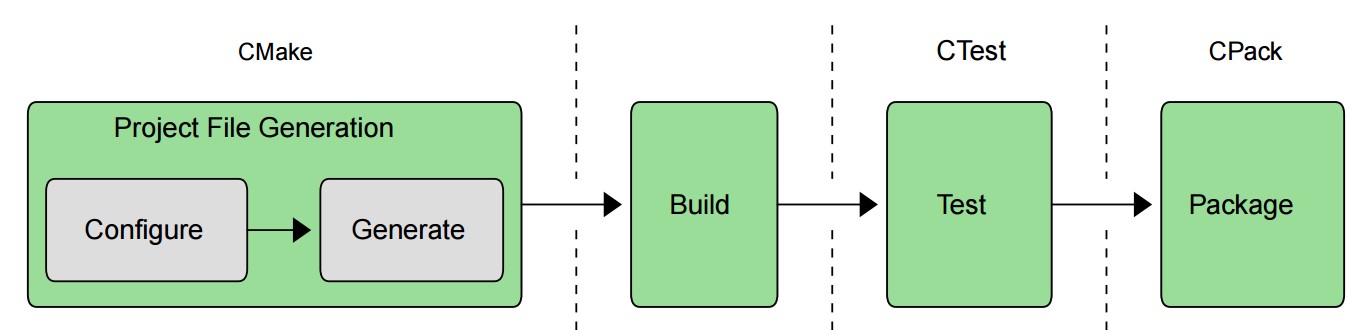
the CMake suite of tools also includes CTest and CPack for managing the later testing and packaging stages respectively. The entire process from start to finish can be driven from CMake itself, with the testing and packaging steps available simply as additional targets in the build. Even the build tool can be invoked by CMake.
Chapter 2. Setting Up A Project
A fundamental part of CMake is the concept of a project having both a source directory and a binary directory. The source directory is where the CMakeLists.txt file is located and the project’s source files and all other files needed for the build are organized under that location. The source directory is frequently under version control with a tool like git, subversion, or similar. The binary directory is where everything produced by the build is created. It is often also called the build directory.
CMake, the chosen build tool (e.g. make, Visual Studio, etc.), CTest and CPack will all create various files within the build directory and subdirectories below it. Executables, libraries, test output and packages are all created within the build directory. CMake also creates a special file called CMakeCache.txt in the build directory to store various information for reuse on subsequent runs. Developers won’t normally need to concern themselves with the CMakeCache.txt file
The build tool’s project files (e.g. Xcode or Visual Studio project files, Makefiles, etc.) are also created in the build directory and are not intended to be put under version control. The CMakeLists.txt files are the canonical description of the project and the generated project files should be considered part of the build output. When a developer commences work on a project, they must decide where they want their build directory to be in relation to their source directory. There are essentially two approaches: in-source and out-of-source builds.
Once the choice of directory structure has been made, the developer runs CMake, which reads in the CMakeLists.txt file and creates project files in the build directory. The developer selects the type of project file to be created by choosing a particular project file generator